


Most successful Twitter users do two things very well:
First, they identify Twitter techniques that drive results.
Second, they focus all their efforts in executing and scaling those Twitter strategies for their accounts.
You might be thinking:
“This sounds great and all, but I have no idea what are the best social media management tips for Twitter?”
Being on Twitter for over 6 years now, I have been able to weed out what works and doesn’t for optimal social media management of Twitter .
And today, I spill the beans on some of my favorite Twitter tips and tricks.
So let’s jump in.
Fill Out Your Twitter Profile
One of the first things that someone looks at on Twitter is your profile page. You won’t make it far on Twitter (or any social channel) if your profile page lacks some important details.
First and foremost, make sure you have a profile picture. Not only is it good for business or personal branding, but it helps people put a face to a name. Just be sure that the image you use is decent enough to make a good impression, so I’d advise against using pictures that wouldn’t make your parents proud.
Next, you will want to be sure to include as much relevant information as you can within the available options. This will cover your bio, location, website, and birthday.
[bctt tweet=”The important thing about your Twitter bio is to add a twist to make it memorable.”]
For example, on my personal profile I mention that I am an “Ambidextrous Bowler.”
Say that again? What does that even mean?
Basically, I have a useless talent where I can bowl with either hand.
While this has nothing to do with my professional experience, it helps open conversations with my followers on Twitter.
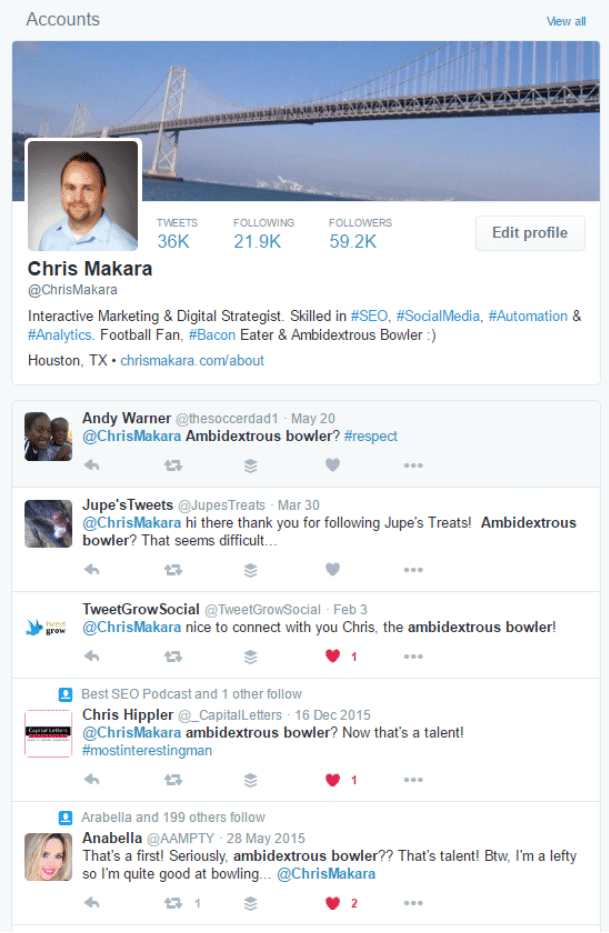
Of course mentioning bacon and the NFL also helps start conversations.
The key is to balance your professional experience with something that catches them off-guard. Most people will skim through the expected skill-sets, but then be drawn to something out of the ordinary. It’s your job to catch their eye.
Build a Targeted Twitter Audience
With the wide range of social media automation tools available, there is no reason you can’t build a targeted and scalable Twitter following. But before you go diving into following tons of people, let’s take a look at how you can find more of the right users.
Whether you believe in the follow/unfollow approach, it does work to an extent.
Basically, you follow users in hopes of them following your Twitter account back. After a period of time, you unfollow anyone who has not followed back. The reason for unfollowing people helps your Twitter account stay within the accepted ratio for users you are following compared to who is following you back.
Currently you can follow up to 5,000 people while having less than 5,000 users following back. Previously, it was a threshold of 2,000 users.
What this means is that once you are following 5,000 people, you must have 5,000 people following you back in order to follow more people. Once you have crossed the 5,000 user benchmark, then you can follow more users.
Please use this Twitter tip at your own risk. Twitter is against bulk following and unfollowing, so be careful.
With that said, at a high level, there are a handful of approaches you can take to build your followers.
Follow Another Account’s Followers or Following
One of the tried-and-true approaches that works rather well. The idea is that by identifying a Twitter account who has an audience similar to yours, then you can try following users of that account in hopes of them following your account back.
For example, let’s say your business offers marketing activities or services for small businesses in Houston.
As a whole, you are looking to work with reputable businesses within the Houston area. In order to identify these businesses on Twitter, you will want to look for Twitter accounts that focus on having a follower base made up of Houston area businesses.
To do this, you’ll need to head over to Twitter’s advanced search.
Then you will want to enter criteria like this:
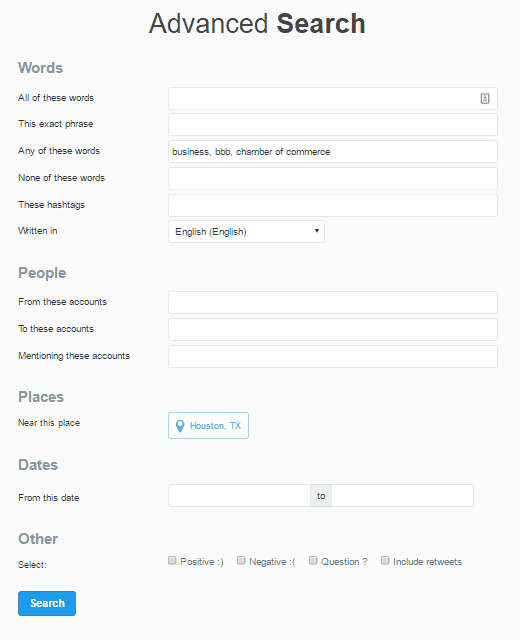
In the “any of these” words section I entered the phrases “business”, “bbb”, and “chamber of commerce.” I have chosen the language to be “English” and near “Houston, TX.”
Once you run the search, you will need to click on the “Accounts” tab.
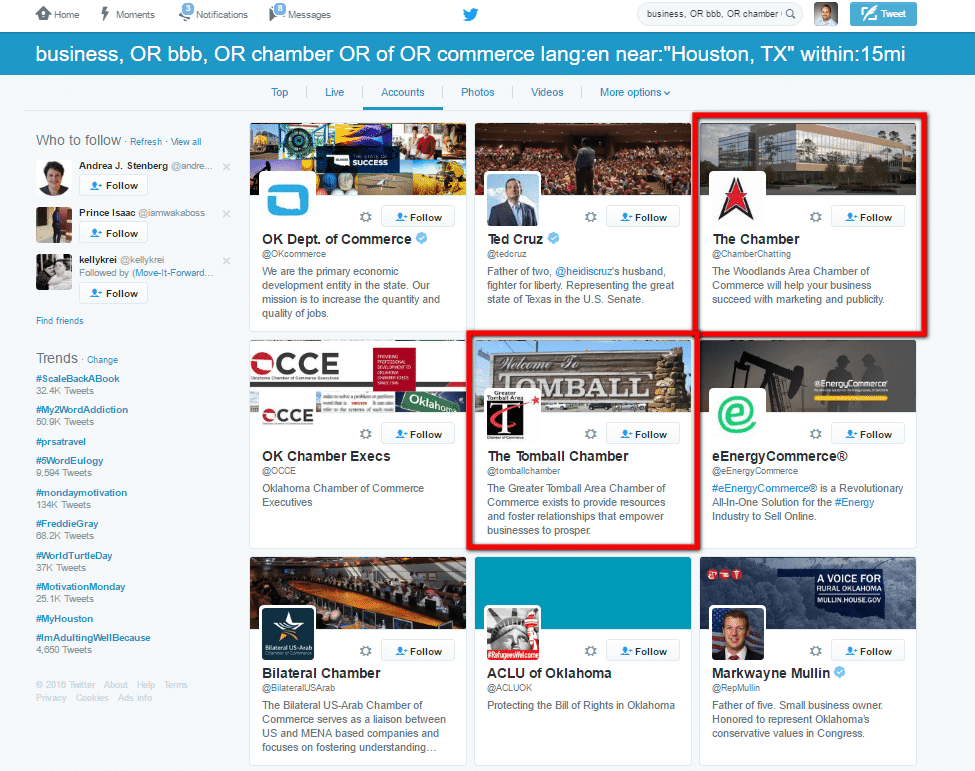
On the accounts page, you can see two Twitter accounts located within the Houston area that would be a good start to identify followers to follow.
Depending on what tool or method you will use to follow these users, simply make note of the usernames from the search results to use in your following tool.
Ideally, you will want to build a nice list of accounts to find followers from. This way you can revisit each account periodically to find and add new followers they have gained since the last time you followed users from their profile.
Follow Twitter Users Based On Tweets
Similar to following another accounts followers, this method will utilize Twitter search to identify users who have tweeted something containing your specific keyword phrase.
Chances are if someone is tweeting using a specific phrase, then they are probably interested in that topic.
You can do this the manual way and use Twitter search to find accounts that used a specific keyword phrase in their tweet. I won’t go into this, as I’m more interested in streamlining mundane, repetitive efforts.
If you want to follow users based on what they have tweeted, there are quite a few social media tools that can do this.
Depending on the tool you choose to use, you can search for tweets with additional filters (like Twitter’s advanced search) based on date range, location, number of followers, etc.
Just keep in mind when following many users at once, you’ll want to stay within Twitter’s limitations.
Purge Your Twitter Following
As mentioned previously, Twitter has limitations on how many users you can follow without a certain amount following back.
In order to help clean up your list of people you follow, through the use of tools you can easily clean up your Twitter account in order to follow more users. Most advanced tools like ManageFlitter will allow you to unfollow Twitter users based on the following criteria:
- Users not following you back
- Twitter users without a profile image (they’re an egghead)
- Non-english speaking accounts
- Inactive accounts (users who have not tweeted in the last X days)
- Fake accounts (Twitter accounts that are deemed to have a high spam grade)
- Users with an unbalanced follower/following ratio
- Accounts that tweet too much (or too little)
- Unfollow low influential Twitter users
Here’s what it looks like in ManageFlitter (there are other tools that offer similar features):
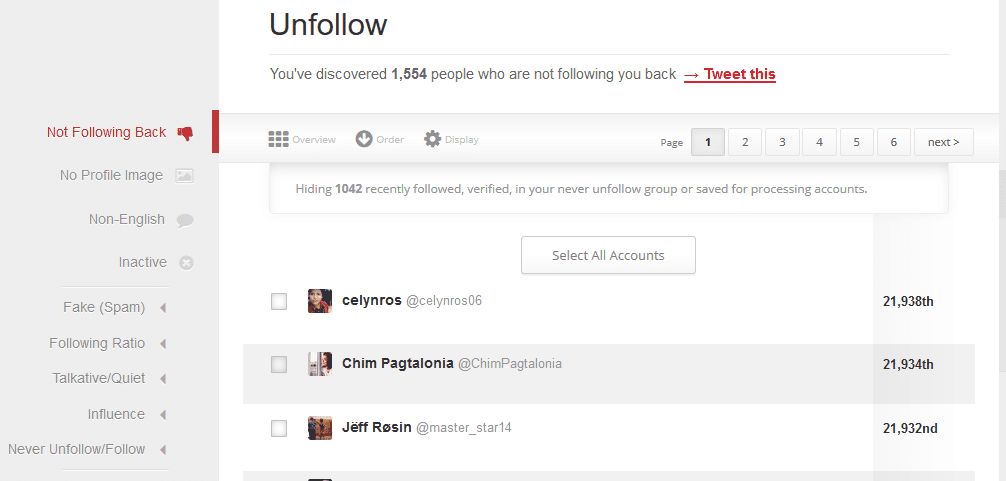
With all these options, there’s no reason you can’t slim down the users you are following in order to stay within Twitter’s limitations. You’ll just need to find out what approach makes the most sense for your Twitter account.
Create Twitter Lists
Once your Twitter account is following hundreds or thousands of accounts, your Twitter stream becomes difficult to sift through. The way I combat the issue is by creating lists to segment the users I follow.
With Twitter lists, there are two ways you can create them.
The first is a public list – which means others can see your list and who is on it.
The second is a private list – this will prevent other Twitter users from seeing the list or who is on it.
Both public lists can have their advantages and disadvantages.
When you create a Twitter list, you are adding Twitter users to it. Then you can simply view the list to see the tweets from the users on that list.
For example, this list which I created for some of the social media users in Houston that I have connected with. While the list is small, it allows me to easily see what each of these users is tweeting.
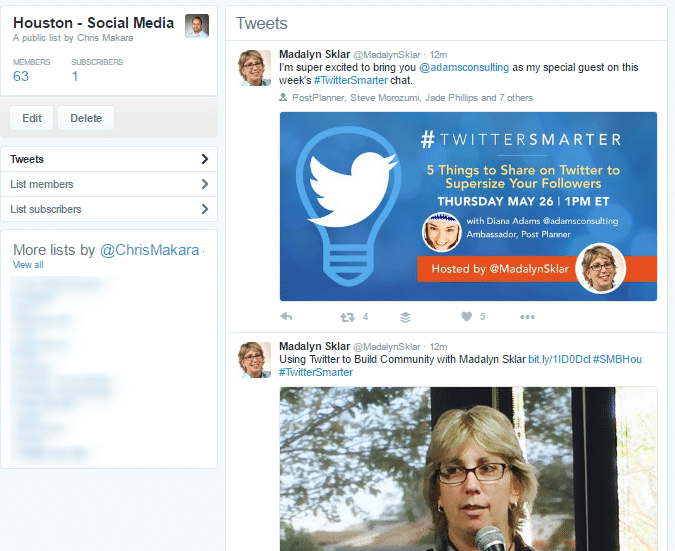
However, if I didn’t want anyone to see this list I could set it to private.
Why might you want a private Twitter list?
There are a number of reasons you will want to keep a Twitter list on the down-low. Here’s a few:
- List of competitors that you don’t want to know you have added to a list
- Your guilty pleasures – like news about a really bad TV show you won’t admit you watch
- Tracking competitors clients – knowing when they are up for renewal and sweeping in at the right time
The thing with a public list is that when you add someone to it, they get notified that they have been added to a list. This is great if you want to build awareness of you or your brand. However, if you are using lists to spy on competitors or their clients you probably don’t want them to know what you are up to. So by using private lists no one gets notified.
Twitter Cards & Images
It’s no secret that images on Twitter generate up to 35% more retweets?
So it only makes sense that you should use them in your tweets.
The first thing you will need to do is for your own website. You will need to be sure you have “Twitter Cards” or “Open Graph” tags set up.
Either one will work.
These tags are pieces of code that will tell social networks what title, description and image to use when a link from your site is shared.
Without these tags implemented, tweets with your URL will simply have text, hashtags, and a link – pretty vanilla. However, when either of these tags are implemented, your tweet is sure to stand out:
You can read about how to set up Twitter cards here.
By default, Twitter will look for the “Twitter Cards” code first and if it is not found, then it will default to the “Open Graph” code.
If you use WordPress, then there are a variety of plugins that make this easy. You’ll just need to sift through the options for Twitter cards or Open Graph plugins. If your website is not WordPress, you’ll likely need to talk to your developer about implementing this.
Aside from having your websites show images when the URL is shared, you should also create and/or attach images in your Twitter updates.
[bctt tweet=”Now, you don’t have to be Picasso to create Twitter images – just know how to type in Canva.com on your browser.”]
Using a tool like Canva, you can make an image in just a few minutes. Canva has plenty of pre-made templates for each social network – even Twitter.
Just grab a template for Twitter and tweak to your needs. Download it and attach it to your next tweet.
But why use an image just once?
Stretch the life of your images by using them again and again.
This can easily be done with Bulkly.
When creating your tweets, you can enter a URL of the image you want to attach with your tweet. Bulkly will then send this update to your Buffer queue. In your Bulkly settings, you can recycle this tweet to post again at a later time automatically.
For example, check out this tweet I have set to attach an image on Twitter:
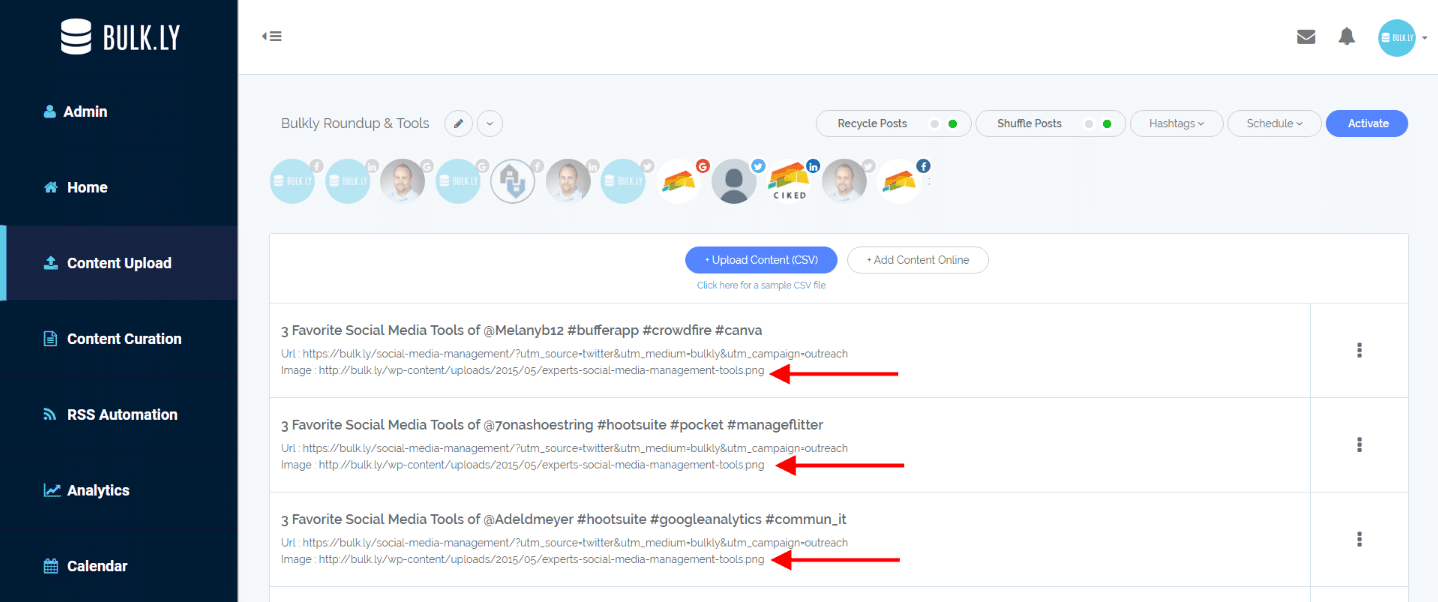
And here is the posted tweet with the image:
You’ll notice in the dashboard screenshot of Bulkly, you can choose how many times a day to send this tweet to Twitter as well as to whatever Twitter accounts are connected to your Buffer account. Once set up, it will send to Buffer at those intervals until you delete the group from your Bulkly dashboard.
Use Hashtags that Mean Something
Hashtags can be extremely useful if you use them the right way and within reason. You might have seen people use off the wall hashtags that make no sense – you’ll want to avoid this.
Instead, you should aim to use 1-2 hashtags at the most in your tweets.
According to Buffer, if you use more than 2 hashtags your engagement can drop by an average of 17%.
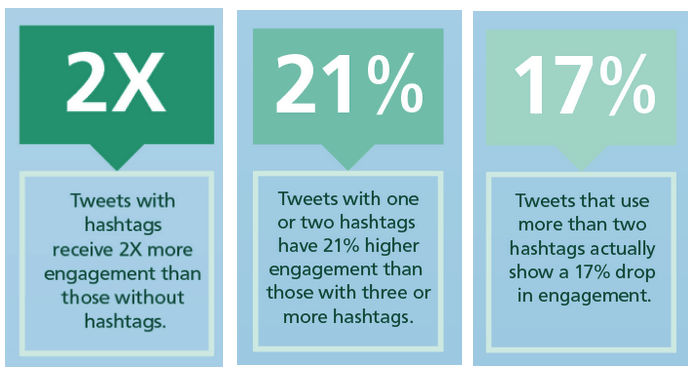
When using hashtags, you want to use hashtags that other people actually use and search for. For example, if I am sharing this post I would probably want to use something like “#social #analytics” and not “#omgsocialanalyticsarethebomb”.
No one would ever search for #omgsocialanalyticsarethebomb.
But, if someone searches for “#social #analytics” I have a better chance of showing up in the search results for something someone will actually search for.
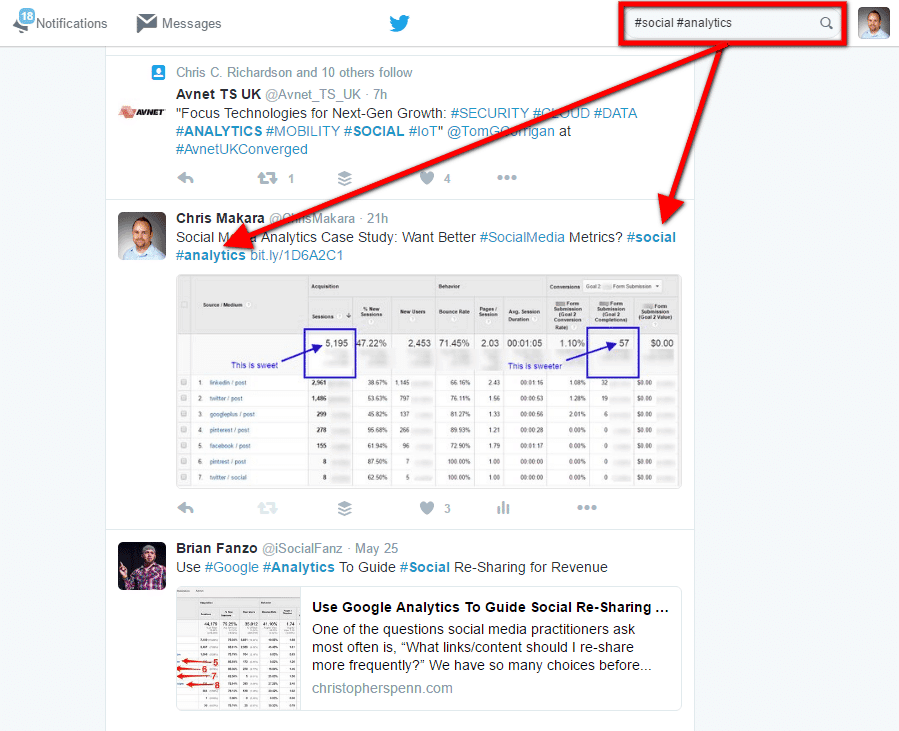
Hashtags help people be more specific with their Twitter searches. By using common hashtags, your tweet will have a better chance of appearing in the results. If you make up some random hashtag, no one is ever going to find it and you’ll just be wasting valuable character count.
Be Smart With Social Media Automation
Obviously, I am a huge fan of automation. If there is a way to automate something, I want to know how to do it.
My process goes something like this…
Can it be automated?
If yes, then the next step is…
Should it be automated?
This answer is a bit tricky, because with the use of automation there can be a trade-off you have to consider.
When it comes to social media automation, you’ll need to think it through so you don’t look like a robot.
If I end up achieving the same results through automation as I would by doing it manually, then automation is typically the route I will go. Whereas if the results are different or less than ideal, then I will typically skip out on automating the task.
For example, automating your Twitter updates makes sense instead of doing it all manually. It probably doesn’t make sense sending automated @ replies to anyone who uses a specific keyword or hashtag.
The trick to social media automation is to find the right balance of use and incorporate it into your overall Twitter strategy.
Repost Evergreen Content
When you write evergreen blog content, your hoping to rank organically in search engines for phrases that people will search for year after year.
But check this out…
Most people think you can only tweet about something one time.
Think about it. You spend days or even weeks writing your blog post. Once published, you tweet about it once and then get started on your next blog post?
That’s insane.
Be smart and use a social media tool (like Bulkly) that can send these tweets again and again. Automatically.
Ideally, you will want to create various text to use for these updates. For example, you can create tweets from your content using:
- Sub-headlines
- Key statistics
- Important information
- Quotes
Any decent blog post can easily have 10 different updates you can cycle through. Simply create them and save them in Bulkly.
Your posts will get recycled automatically through an ongoing basis.
Mix Up Your Content Sources
One of the biggest mistakes on Twitter is someone who only posts their own content.
Spending too much time talking about yourself on Twitter, and others will quickly tune you out.
Instead, you need to use a variety of sources to find content to share on Twitter. The easiest way to do this is to curate a list of websites related to your industry that post content on a regular basis.
Since these sites are producing content regularly, you can easily share some of their stuff on your Twitter account.
I know what you are thinking…”I don’t have time to check in for new content to tweet.”
I hear you.
This can be easily automated with a social media automation tool like Bulkly. Simply add the RSS feed URLs of the sites you want to use content from and add them to your Bulkly account. Then tell Bulkly how often you want to send this content to you Buffer account. Just a few times a day should be ok.
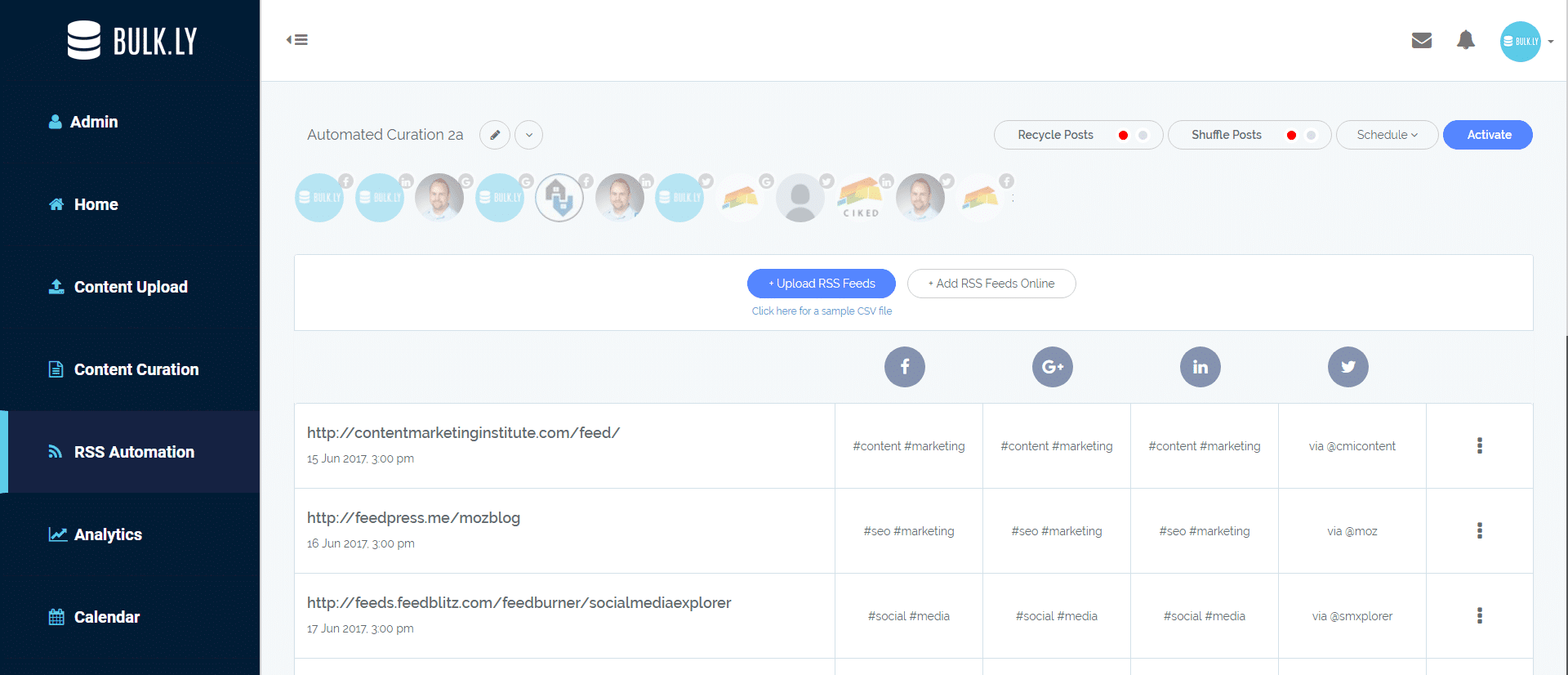
Once setup, Bulkly will select random items from a RSS feed in your group to send to your Buffer account.
Engage with Your Followers
The end goal of Twitter (or any social channel) should be engagement.
Everything you do should be done around driving a following that engages with your social media updates. Engagement can mean quite a few things, but for Twitter I like to look at link clicks, retweets, and @ replies.
To know whether someone is engaging with you, you will need to have some sort of social media monitoring in place.
Whether you roll with the Twitter app/web notifications or use something a little more robust like Hootsuite, staying on top of engagement is key.
In Hootsuite, I have a few streams set up to monitor engagement as well as a few lists.
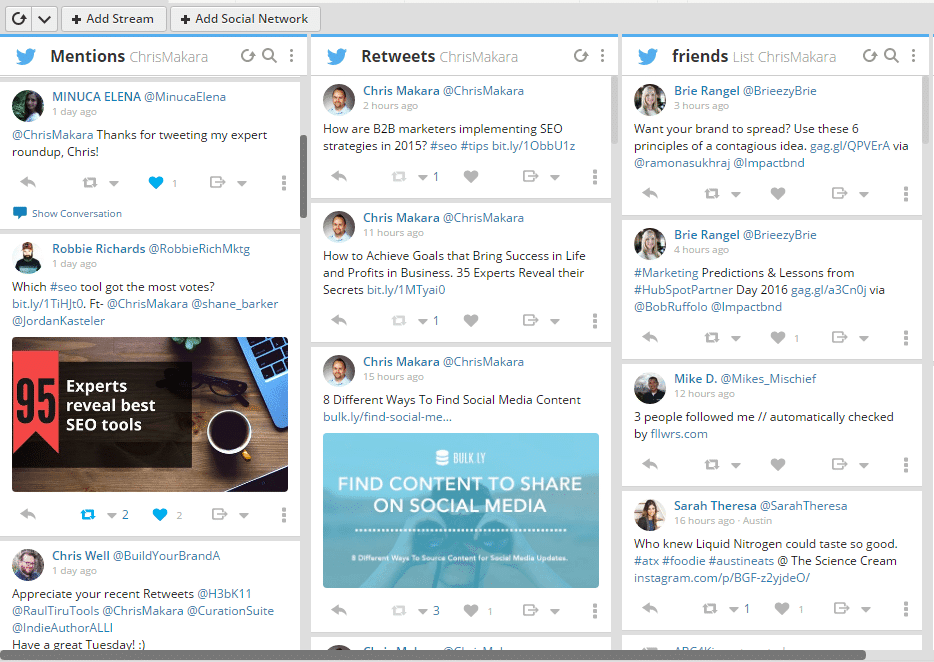
From my dashboard I can easily see who is engaging and go from there.
Now, I do find that Hootsuite does seem to miss a lot of the interaction that gets picked up in the Twitter app. Because of this, I find myself relying more on Twitter instead of Hootsuite to monitor engagement.
No matter what method you use to track Twitter engagement, when you know who is engaging, you can continue the conversation with them. If you are ignoring the engagement, then why are you using Twitter at all?
Twitter Tips: What To Do Next
Are you interested in implementing these Twitter tips to get more out of your account?
If so, be sure to download the free Twitter strategy checklist for this post.
This checklist will give you a go-to PDF that will help you with all the tips listed here.
[yellowbox]Twitter Tips Checklist: This checklist will give you a go-to PDF that will help you with all the tips listed here. Click here to get it! [/yellowbox]
Click the image below to download the Twitter checklist.