


Keeping your social media profiles full of great content won’t happen by accident.
Nope, you’ll need a social media content calendar to make it happen.
Why?
Well, having a plan for social media updates ensures that you won’t be left scrambling to find something to share when it’s crunch-time.
Let me ask you something…
Do you wear a watch? Use an outlook calendar? Carry a day planner with you? Hang a calendar in your work or home office?
Most likely, you answered yes to at least one of the above.
And the reason why is obvious.
You can leave earlier for work on Tuesday, when you know your offsite meeting that morning takes longer to get to than the office.
You can pick up dinner on Wednesday knowing soccer practice is at 6 pm that evening.
You can put out all the dishware your mother-in-law gave you when you know she’s coming to visit next week…
You get the picture.
Having a plan in place helps you be more effective at whatever it is you do.

And not just that – it allows you to be more flexible and strategic when things you didn’t expect pop up out of nowhere.
Like using the time you’d normally spend making dinner to clean up after the 14 soccer players that you didn’t know would be coming over that evening.
Like life, effective social media management requires forethought, with unexpected issues and opportunities popping up all the time. Therefore, having a plan in place leaves you better equipped to handle any curveballs thrown your way.
And in this guide, I’ll cover everything you ever wanted to know about social media content calendars. You’ll learn:
What is a social media content calendar?
If you’ve been managing your brand’s social media accounts long enough, you probably have a pretty good grasp on the kinds of posts you share on a regular basis.
But sitting there every day, drilling out copy and posting in real-time is cutting into the time you really should be spending on engaging with followers or coming up with your next great ad campaign.
Not to mention churning new social updates out every day can be super tedious and boring.
But what if you devoted a single chunk of time to planning, drafting and scheduling ALL of the content you’re going to share that week, month or maybe even quarter?
By doing so, you’d be creating a social media content calendar: a dated outline used as the framework for the posts you’re planning to share over a set period of time. Then you can flesh it out on a daily basis with real-time updates: engaging with followers, sharing timely external content and monopolizing on spur-of-the-moment trends and updates.
Sound intimidating? Sure. But it doesn’t have to be.
No need to over complicate it – building out a social content planning calendar should help you save time, not waste it.
Make it your own. Pick a format that you feel most comfortable using (we’ll talk more about that later). Cover a manageable span of time.
Believe me, the benefits are worth the effort.
Why use a social media content calendar?
We’ve already mentioned the “duh factor” of why it pays to use a social media content calendar: you’re setting aside a few hours to build out social media updates for a longer period of time than just the here and now.
Thus, saving you time overall and freeing you up to become more strategic on a daily basis.
Strategery for the win.

Now let’s dig a litter deeper into the additional benefits you can expect to gain by using one.
1. Be prepared for the unexpected.
Stuff happens. Whether you get the flu or your office loses power, the unpredictable is always going to pop up when you least expect it.
If you don’t have plans for what to share that day and posts scheduled in advance, your social media accounts go dark when you do.
Having a social media content calendar in place affords you backup for times when you just can’t make it online as usual.Click To Tweet2. Post at the optimal time on your social channels.
What time is your audience most active on social media?
Hopefully you know the answer to this, but if you don’t, you can find information like this about your audience via built-in analytics tools (like Facebook Insights) or other free or paid tools.
Say you know your audience is most active in the evening, from 4-7 pm.
Are you always free then to be posting in real-time?
Are you sure your morning meetings won’t run over and cause you to have to scramble to find content worth scheduling for that afternoon?
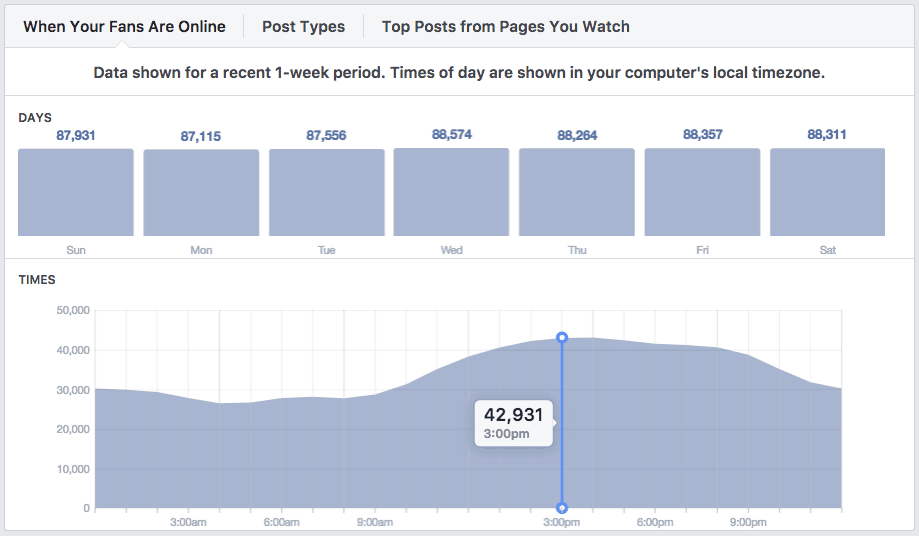
When you use a social content calendar, you can design it to emphasize your most engaging content and/or greatest frequency of posts during the period of time that your audience is most active (here’s how to find the best time to tweet). With this content planned and scheduled in advance, you never have to worry about potentially missing your optimal posting window.
And you can plan to be actively engaging with your audience then as well.
3. Manage multiple social media accounts effectively.
Who ONLY has a Facebook page and nothing else? Twitter? Pinterest?
Let’s hope no one’s raising their hand.
The majority of brands have at least two, maybe even five or six different social media accounts to manage and monitor on a daily basis. So you know trying to draft copy for updates that will be equally effective across all accounts takes some elbow grease.
And coordination.
Hopping around all day from one channel to another, posting and engaging, posting and engaging isn’t only going to burn you out pretty quickly and increase the risk of mistakes (wrong sized image, inaccurate details, spelling errors, etc.), it’s just not efficient.

With a social content calendar, you can easily draft your copy for a particular piece of content and then copy and paste it across days and accounts, making minor tweaks, as needed.
This keeps you focused on getting the copy right and making the appropriate adjustments…instead of losing efficiency and effectiveness by logging in and out of various channels, getting distracted by new updates, etc.
4. Set reasonable deadlines.
Ever about to post something and suddenly realize: a unique social media image would be good about now.
Well, when your designer has been alerted with three minutes lead time, chances are you’re not going to get a stellar image right away, if at all.
And if you’re the one creating your own social media images, you’re not going to be exceptionally creative feeling the pressure of cranking something out last minute.
When you have a working social media content calendar, with planned posts, set for specified dates, you can submit a request or write yourself a note to get working on an image well in advance of when it will be published.
By the way, the benefit of planning ahead doesn’t just apply to images. You’re also leaving yourself more lead time for additional research, team member approval, copy edits, etc. (a.k.a. the finishing touches that will enhance the quality of your updates) before posting.
There will always be rush jobs and last minute requests. But using a content calendar can make these less the norm and more the exception.
5. Preserve your public image.
Like mom used to say, not everyone is going to like you. And that’s okay. It happens.
But what’s not okay is responding to an angry customer or online troll with a caustic response that reflects badly on your brand. I know, I know, you didn’t mean to actually post it…
But that’s what happens when you’re rushing around, doing everything on the fly. You get a complaint and you don’t take a minute to breathe, step back and consider the proper response. You can’t – you’ve got to get to the next thing before you miss that posting window.
When you’ve already got posts scheduled and planned via your social content calendar, you aren’t worrying about writing copy for the next Tweet or Facebook update you need to get posted before 4 pm. That’s taken care of.
All you need to do in this moment is focus on this one complaint from this one customer.
Save yourself from yourself. Pre-planned and pre-scheduled posts afford you a time buffer so you don’t make split-second mistakes that can cost you your brand’s reputation.Click To TweetSo what do you think? Pretty cool, huh.
Now that you’re well aware of the benefits of using a social media content calendar, it’s about time you learned how to build one.
How do you create a social media content calendar?
Building a social media content calendar that best fits your business is an endeavor, but nothing to stress over. Again, find what works for you and make it your own.
Remember, this is a tool that’s supposed to help you be more effective at what you do – not waste your time or add to your to-do list.
Ready to get started? First things first…
1. Pick your medium.
I’ve shared some benefits and a basic description of what a social media content calendar is, but have you ever actually seen one in action?
It might benefit you to do a little of your own research to see what others have used in the past to get the feel of what you may like best. Word to the wise though, there are tons of websites out there touting whatever they deem the best structure and approach.
So I’ll offer you some tips to help you navigate.
All social media content calendars essentially fit into four different categories:
- Old-fashioned calendars: These are essentially the first thing that comes to mind when someone says “calendar” – they’re just a printed out blank monthly calendar, with space for you to draft your updates. You can find free downloads off of sites like com to print out and add notes and copy to by hand before scheduling. This is harder to share and messier, in my opinion, but hey, to each their own.
- Social media tools: Those who prefer to go the fully digital route may decide to invest in an app or social media tool to build out their content calendars. These aren’t free, but they can be very effective when it comes to ease of moving things around, making copy edits, duplicating posts across multiple channels, etc. Hubspot, Sprout Social and Hootsuite offer various options that work well, depending on your preference and need.
- Excel spreadsheets: You can easily make your own calendar in Excel, by labeling columns as each category of information you’re planning to include and adding each update as a new row. With the addition of being totally free, spreadsheets offer many of the same benefits that paid tools offer, such as easy sharing, copy edits and post duplication.
- Free templates: If you don’t want to mess with creating your own calendar in Excel, you might want to give any of the litany of free downloadable content calendar templates online a try. Some of these work best via Google Docs, which can enhance the ease with which you can collaborate with others to make edits, review content, etc.
If you’re having trouble choosing, I’d suggest trying a free template or Excel sheet to get started. This way, you won’t be spending a ton of money without knowing if that particular format or tool is right for you.
2. Nail down your most appealing content.
What content receives the most likes, shares and comments on your social channels?
This is the stuff that you want to fill your content calendar with – the content that truly resonates with your audience.
You can get a basic idea of what generates the most engagement through your everyday monitoring and responding tasks. But for actual data, dig into your social media analytics.
One thing to note here: make sure the content you’re sourcing is “evergreen”, meaning it will be relevant to your audience no matter when the post date is. Remember, you’re mapping out posts for weeks, maybe months in advance, so you’ll want to avoid scheduling news updates or trendy stories that may be relevant now, but outdated next week.
3. Determine your post frequency (for each channel).
How often will you share updates on each of your social media accounts?
To decide, simply refer to your current post frequency: if you typically post to Twitter six times a day, then continue to do so…if that’s working for you, of course. If not, maybe mix it up and try posting more or less frequently.
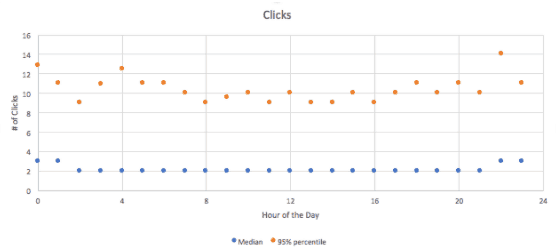
That’s another thing social media content calendars are great for – serving as a historical record of techniques and options you’ve tested. This way, you can easily compare results over time and make smarter adjustments moving forward.
Don’t forget to accommodate for the needs of each social channel individually. Meaning, if you decide to post to Twitter six times a day, there’s no need to do the same for the rest of your channels unless that’s what has worked for you in the past.
4. Decide when to post (for each channel).
When is the best time to share updates on each of your social media channels?
We talked about it briefly earlier, but as a reminder, finding out when your audience is most active on each of your social media channels is best determined by digging into your analytics via built-in tools (like Facebook Insights) or other free or paid tools (like Google Analytics).
You’ll want to be able to get a general feel for this before you start mapping out your calendar. Knowing your optimal post times will aid the degree to which your updates get seen and the amount of engagement they generate.
5. Choose what you’re going to include.
Because your social media content calendar serves as a planning tool for you (and your team, if you have one), the level of detail you want to include is up to you.
Some people prefer to just use content calendars as a skeletal outline for the types of posts they intend to flesh out at later date. Others want everything outlined and down in writing to easily transfer into a scheduling tool.
Obviously, your choice depends on the amount of time you want to invest now vs. later.
But if you go the outline route, just make sure you don’t wait till last minute to finish it off. Otherwise, you’ll be right back to your old ways of last minute scrambles to write and share updates.
Here are some ideas for the type of information commonly included in social media content calendars:
- Topic/type of post
- Link to the content
- Notes on the general idea/goals of the post
- Actual copy for the post
- Post date
- Post time
- Image (include thumbnail or link/reference to where the file is located)
- Hashtags
Feel free to add and/or eliminate from this list to best suit your work process and preferences.
6. Flesh out your calendar.
Finally! Time to actually start adding this information into your content calendar.
Depending on the medium you’ve chosen, your process for filling out your post information will vary.
- If you’ve gone the old-fashioned printed calendar route, there isn’t much to explain – simply start filling out the days by hand with the pieces of information you’ve decided to include.
- If you’ve chosen a paid tool, you’ll essentially be scheduling as you fill out your calendar, saving you a step in the process. Follow the prompts and instructions for the tool you’ve chosen and include the necessary information. Most tools offer the ability to toggle between entering data and viewing it in different layouts, such as “calendar” or “list” view. Some, like Hootsuite for instance, allow you to drag and drop content to different dates as needed and edit copy with ease.
- If you decided to build your own spreadsheet, I’d recommend adding columns for each category of information you’ve decided to include (i.e. post date, post time, hashtags, etc.) and making each row a different post.
Keep in mind, spreadsheets are going to be a little “messier” than paid tools when trying to organize updates for multiple posts on a single day.
If you’ve opted for using a list format (individual posts as rows), you may want to add a column that identifies the particular channel you’re looking to post to. Or, you may decide to build separate calendars for each of your social media accounts.
- If you’ve chosen a free downloadable calendar, fill in the information per the format provided. These formats may vary in terms of style and layout, which is why it’s so important to do your research ahead of time to find a format that will accommodate your needs and preferences.
For those using paid tools, the process ends here.
Updates have been added and scheduled and are ready for sharing with other team members for review and edits. Or, mark your calendaring tasks complete and move on!

For those using printed calendars, spreadsheets or downloadable calendars, you’ve got options.
7. Schedule your updates.
At this point, you may want to take the next step and decide to invest in an inexpensive scheduling tool like Buffer. Doing so would allow you to upload and schedule out all of your social calendar updates for the next few weeks or months – done.
Side note: After using a spreadsheet, downloadable calendar or printed calendar for a while, you may find that a paid tool where everything is done in one go will end up being the most efficient option for your business.
But again, that’s the benefit of social media content calendars. When you make them your own, you have the flexibility to decide what works best for you and your brand – and change course as needed.
Worried about the repetitive factor?
I’ve found that the idea of mapping out a social media calendar every few weeks or months tends to be viewed from two distinctly different perspectives.
One, people love it and need it. They run monthly themes on their social channels and enjoy the creativity of starting from scratch to create something new. Or maybe things change on such a regular basis that they need to re-map everything every few weeks because the last collection of content won’t be engaging for their audience anymore.
Two, people despise it. They might run some new campaigns or one-off updates here and there, but for the most part, they’re largely just rotating blog content, videos, e-books, testimonials, motivational quotes and other resources as social updates from month to month. For them, building new content calendars and uploading content over and over is tedious and time-consuming.
But it’s all good. There’s a solution for this second group of social media users and it’s way better than recycling old content calendars every other month.
When automation is the answer for a social media content calendar
If you have a standard list of “evergreen” content that you regularly share with your audiences, complemented by one-off updates, social media automation is the solution for you.
Investing in a social media automation tool allows you to cut the calendar-building process out of your to-do list and just upload a list of your regular social media updates into a tool that will post them for you on a continuous basis.
No mapping out dates. No organizing content by hand. Just upload, set parameters and hit activate.
If that sounds like something that interests you, then checking out my tool, Bulkly, might just make your life a whole lot easier.
All you need is $12 a month to get started, plus a Buffer account.
In your Bulkly account you can import your past 100 social updates sent by Buffer for each social media account and curate them directly inside Bulkly.
Then choose how often you want Bulky to send them and that’s it.
It doesn’t get much easier than that.
But if you are starting from scratch (or already have social media content calendar built out), you can easily transition that data into Bulkly.
The process would look like this:
- Download the CSV file template from the Bulkly website.
- Fill out each of the columns: group (social channel), content (post copy), URL (post link), image link (link to image, if needed).
- Save your CSV file.
- Upload your CSV file to Bulkly’s content upload section.
- Adjust the posting schedule to your preferences and save.
- Click activate.
- These posts will now be sent to Buffer to fill up your queue and be posted to your social media accounts according to the schedule you’ve selected.
See? No worrying about organizing themes, dates, times, etc. over and over and over…every few weeks or months to a nauseating degree. Now, you select all of this information in Bulky one time and it does the repetitive work for you.
And to top it all off, using a tool like Bulkly affords you all the additional benefits of using a content calendar: greater efficiency, more time to spend engaging with your audience, greater focus when it comes to handling customer service issues diplomatically, etc.
If you’re interested and are looking for more information, feel free to check out the Bulkly website or contact me personally with questions here.
Benefits of a social media content calendar
Using a social media content calendar offers you a litany of benefits: greater efficiency, higher engagement, better customer service – the list goes on and on.
But it isn’t some kind of “magic” solution.
Building one takes time. You’ve got to find the right medium. Nail down your most engaging content. Decide when and how often to post.
Then you’ve still got to fill the thing out and upload everything into a scheduling tool to be totally done.
Will it be absolutely perfect the first time? No way. The second time? Probably not.
But don’t worry, it gets easier.
And while it’s no magic one-size-fits-all solution, you’ll start to notice a sense of relief setting in over time – you’ll be in a much better position to handle those “curveballs” when they blast in unexpectedly. Better yet, you’ll have the headspace and stamina to snag those fresh opportunities when they pop up too.
What does that mean?
Engaged followers. Positive metrics. Higher brand awareness…the things that really matter for business success.
So what are you waiting for? It’s never too late to get started.
All the tips and tools you need are just a few clicks away to build out your social media content calendar.